 “dry.” domain
Atheism & Religion
Open source
Linguistics
Privacy
“dry.” domain
Atheism & Religion
Open source
Linguistics
Privacy




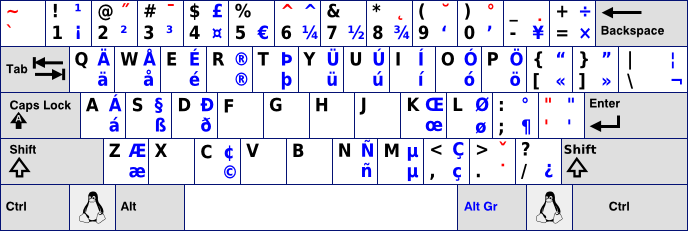
First press the dead key (combination) then release the dead key (combination), and subsequently type a letter.
Example 1: To type Ô, press Shift+6, release and type O
Example 2: To type ğ, press Alt Gr + Shift + 9, release and type g
In some cases you can combine two diacritics like in ậ; first press the dead keys for the circumflex and then the dead keys for the underdot (or vice versa).
Pressing a dead key followed by pressing the space bar produces the character denoted by the dead key; e.g. ~ + space results in “~”, see the third column in the table below.
| Diacritic | Dead key | Space | E | e | A | a | O | o | U | u | Y | y | I | i | Z | z | R | r | M | m | N | n | P | p | W | w | S | s | G | g | K | k | L | l | C | c |
| Acute | ' or ´ | ' | É | é | Á | á | Ó | ó | Ú | ú | Ý | ý | Í | í | Ź | ź | Ŕ | ŕ | Ḿ | ḿ | Ń | ń | Ṕ | ṕ | Ẃ | ẃ | Ś | ś | Ǵ | ǵ | Ḱ | ḱ | Ĺ | ĺ | Ć | ć |
| Grave | ` | ` | È | è | À | à | Ò | ò | Ù | ù | Ỳ | ỳ | Ì | ì | Ǹ | ǹ | Ẁ | ẁ | ||||||||||||||||||
| Umlaut | Shift + ' (") | ¨ | Ë | ë | Ä | ä | Ö | ö | Ü | ü | Ÿ | ÿ | Ï | ï | Ẅ | ẅ | ||||||||||||||||||||
| Tilde | Shift + ` (~) | ~ | Ẽ | ẽ | Ã | ã | Õ | õ | Ũ | ũ | Ỹ | ỹ | Ĩ | ĩ | Ñ | ñ | ||||||||||||||||||||
| Circumflex | Shift + 6 (^) | ^ | Ê | ê | Â | â | Ô | ô | Û | û | Ŷ | ŷ | Î | î | Ẑ | ẑ | Ŵ | ŵ | Ŝ | ŝ | Ĝ | ĝ | Ĉ | ĉ | ||||||||||||
| Breve | Alt Gr + Shift + 9 | ˘ | Ĕ | ĕ | Ă | ă | Ŏ | ŏ | Ŭ | ŭ | Ĭ | ĭ | Ğ | ğ | ||||||||||||||||||||||
| Háček | Alt Gr + Shift + . (>) | ˇ | Ě | ě | Ǎ | ǎ | Ǒ | ǒ | Ǔ | ǔ | Ǐ | ǐ | Ž | ž | Ř | ř | Ň | ň | Š | š | Ǧ | ǧ | Ǩ | ǩ | Ľ | ľ | Č | č | ||||||||
| Double acute | Alt Gr + Shift + 2 | ˝ | Ő | ő | Ű | ű | ||||||||||||||||||||||||||||||
| Ogonek | Alt Gr + Shift + 8 | ˛ | Ę | ę | Ą | ą | Ǫ | ǫ | Ų | ų | Į | į | ||||||||||||||||||||||||
| Macron | Alt Gr + Shift + 3 | ¯ | Ē | ē | Ā | ā | Ō | ō | Ū | ū | Ȳ | ȳ | Ī | ī | ||||||||||||||||||||||
| Overdot | Alt Gr + . | ˙ | Ė | ė | Ȧ | ȧ | Ȯ | Ȯ | Ẏ | ẏ | İ | ı | Ż | ż | Ṙ | ṙ | Ṁ | ṁ | Ṅ | ṅ | Ṗ | ṗ | Ẇ | ẇ | Ṡ | ṡ | Ġ | ġ | Ċ | ċ | ||||||
| Underdot | Alt Gr + Shift + - | . | Ẹ | ẹ | Ạ | ạ | Ọ | ọ | Ụ | ụ | Ỵ | ỵ | Ị | ị | Ẓ | ẓ | Ṛ | ṛ | Ṃ | ṃ | Ṇ | ṇ | Ẉ | ẉ | Ṣ | ṣ | Ḳ | ḳ | Ḷ | ḷ | c | |||||
| Ring | Alt Gr + Shift + 0 | 0 | Å | å | Ů | ů | ẙ | ẘ |
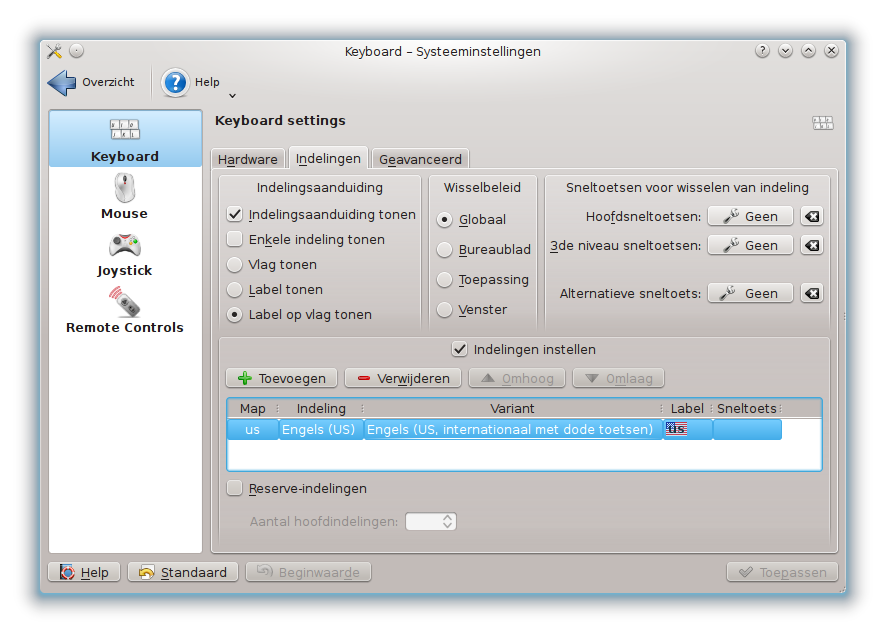
To use the US International Keyboard Layout under KDE4 simply select:  K menu > System Settings > Input devices > Keyboard layouts
And under Variant choose International with Dead Keys (In Dutch “met dode toetsen”).
Don't forget to set your editor to UTF-8 character encoding.
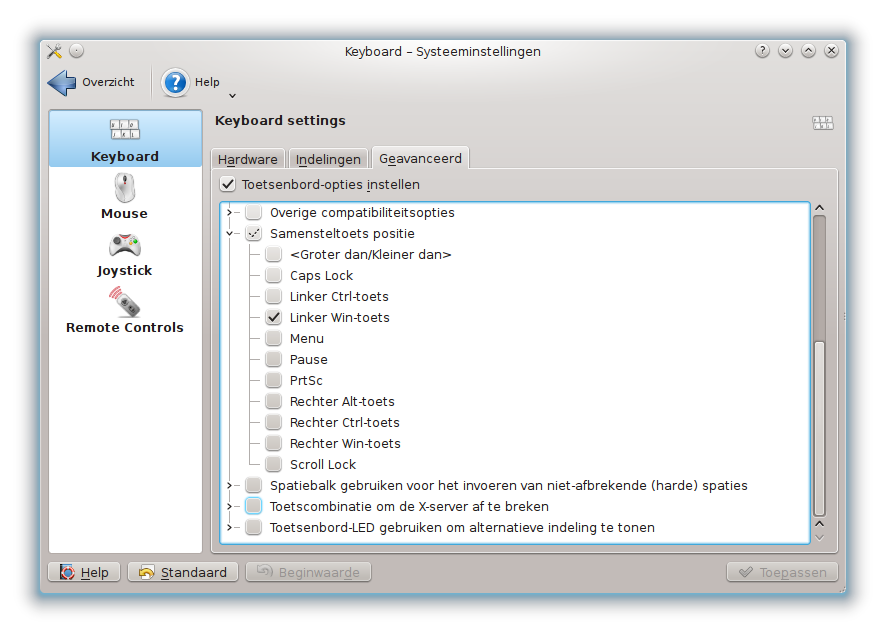
| First | Second | Result |
| + | - | ± |
| t | m | ™ |
| s | s | ß |
| a | e | æ |
| % | o | ‰ |
| o | e | œ |
| _ | 1234567890 | ₁₂₃₄₅₆₇₈₉₀ subscript |
| ^ | 1234567890 | ¹²³⁴⁵⁶⁷⁸⁹⁰ superscript |
| digit | digit | ½⅓⅕⅚⅜⅝⅞ fraction |
| e | e | ə |
| / | l L | ł Ł |
| b | g G | ğ Ğ breve |
| c | a A | ǎ Ǎ caron |
| , | s S | ş Ş cedilla |
| o | a A | å Å ring |
| _ | a A | ā Ā macron |
| i | . | ı dotless i |
| . | I | İ Capital I with dot |
| x | x | × multiplication |
| . | . | … |
| - | > | → |
| < | - | ← |
| : | ) | ☺ |
| : | ( | ☹ |
| . | - | · middot |
| . | = | • bullet |
| N | o | № nummero sign |
| ? | ! | ‽ interrobang |
| < | 3 | ♥ |
| First | Second | Third | Result |
| ( | 123456789 - 20 | ) | ①②③④⑤⑥⑦⑧⑨ - ⑳ |
| ( | aAbBcC - zZ | ) | ⓐⒶⓑⒷⓒⒸ - ⓩⓏ |
| - | - | . | – en dash |
| - | - | - | — em dash |
More compose key combinations
Adding combinations
 |
|
 |
|
 |
|
 |
|

